AWS Cost Optimization: Automating Unused EBS Volume Cleanup with Lambda
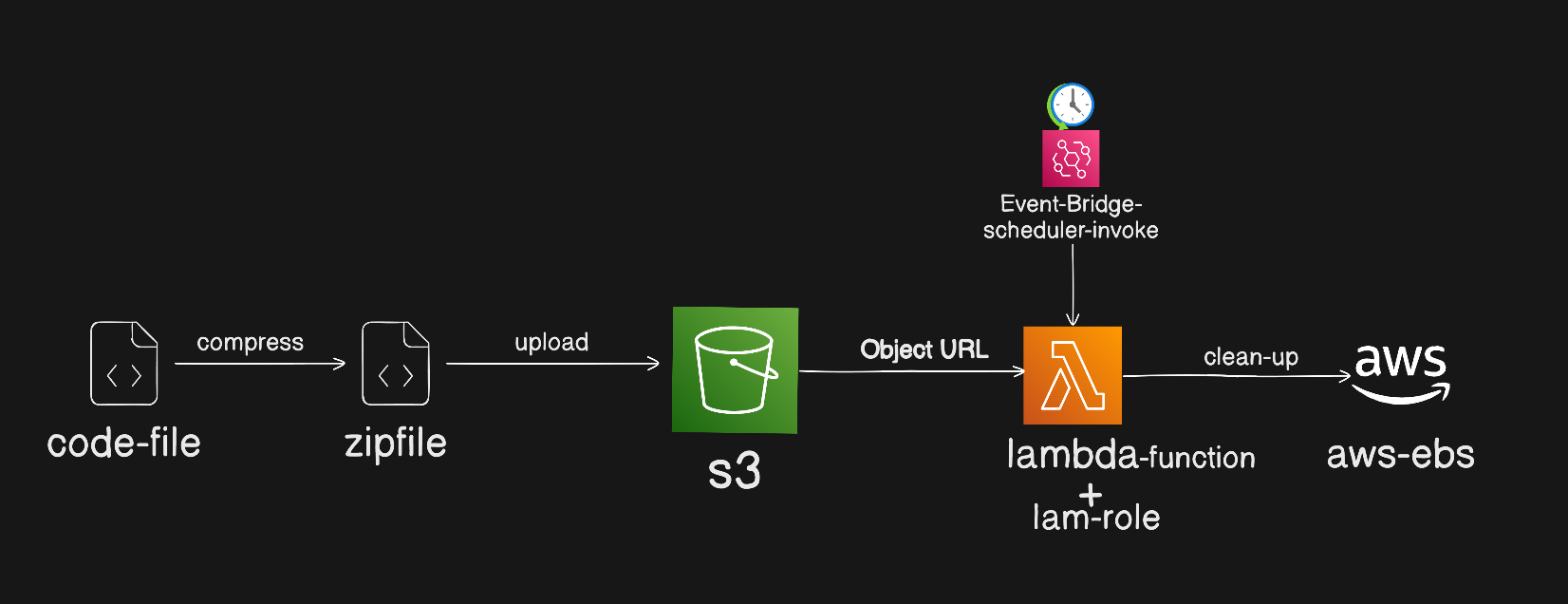
In this project, we tackled AWS cost optimization by automating the cleanup of unused EBS volumes. Instead of manually checking for unattached volumes, we used an AWS Lambda function triggered by EventBridge every 10 days. Here’s how and why we set it up this way.
Why Lambda?
AWS Lambda is a serverless compute service that runs code in response to triggers. We chose Lambda over EC2 because it’s fully managed, meaning we don’t have to maintain or pay for an always-on server. This makes it cost-effective and low-maintenance for a task that only needs to run periodically.
Advantages of Lambda
Cost-Efficiency: You only pay when your code runs, which is perfect for a cleanup job that runs every 10 days.
Simplicity: No need to manage servers, security patches, or scaling. Lambda handles all that.
Integration: Easy integration with EventBridge for scheduling and with S3 for code storage.
Disadvantages of EC2 for This Task
Continuous Cost: EC2 instances run 24/7 unless stopped, which would be more expensive for a job that only needs occasional execution.
Management Overhead: You’d have to handle OS updates, security patches, and scaling yourself.
Why a Zip File and S3?
We package the code as a zip file for easy deployment. By uploading it to an S3 bucket, we can version-control the deployment package and keep the Lambda function code clean and easily replaceable.
How It Works
Coding with Boto3: We wrote a Python script using Boto3 in VS Code to identify and delete unused EBS volumes.
Zipping the Code: We compressed the script into a zip file.
Upload to S3: The zip file is stored in an S3 bucket, making it easy for Lambda to pull the latest version of the code.
Lambda and EventBridge: The Lambda function is triggered by EventBridge on a 10-day schedule to run the cleanup.
Conclusion
Using AWS Lambda with S3 storage and EventBridge scheduling provides a streamlined, cost-efficient way to handle periodic EBS volume cleanup. This approach minimizes costs and operational overhead, making it a great fit for routine housekeeping tasks in AWS.
Absolutely, let’s put it all together into a neat, copy-paste-ready section that you can use directly in your README or blog post.
📘 Full Step-by-Step Instructions for Setting Up the Lambda Cleanup
Write the Lambda Code: Begin by writing your Lambda function code in your preferred language (e.g., Python). For example, you can write a script that lists and deletes unused EBS volumes.
Compress the Code into a ZIP File: Once your code is ready and tested, compress it into a ZIP file. This is the format AWS Lambda expects for uploaded code.
Upload the ZIP File to an S3 Bucket: Navigate to Amazon S3 and upload your ZIP file to a bucket. After uploading, copy the object URL of the uploaded file.
Create a New Lambda Function: In the AWS Lambda console, create a new function. When asked for the code, choose the option to upload from Amazon S3 and provide the object URL you copied.
Configure the Lambda Handler: Go to the runtime settings of your new Lambda function and change the handler to match your code. For instance, if your file is named
lambda_function.pyand your function islambda_handler, set the handler tolambda_function.lambda_handler.Save and Schedule the Function via EventBridge: After saving the function, open Amazon EventBridge and create a rule to trigger it on a schedule—such as every 10 days. This will automate the cleanup process.
Attach the Required IAM Policy: Ensure the Lambda function has the right IAM role attached. This role should have a policy that allows it to describe and delete EBS volumes. For example, include
ec2:DescribeVolumesandec2:DeleteVolumepermissions.
🧹 Automatically Delete Unused EBS Volumes Using AWS Lambda
This AWS Lambda function identifies unused EBS volumes (volumes in available state) and deletes them automatically.
It can be triggered using Lambda Function URL or scheduled via Amazon EventBridge.
🧠 How It Works (Simple Flow)
EventBridge (scheduled rule) triggers the Lambda function
Lambda scans for EBS volumes in
availablestateLambda deletes the unused volumes
AWS storage cost is reduced automatically ✅
🐍 Python Lambda Code (Copy-Paste Ready)
import json
import boto3

# Initialize EC2 client
ec2 = boto3.client('ec2')

def lambda_handler(event, context):
    """
    Lambda function to list and delete all unused EBS volumes
    (volumes in 'available' state)
    """

    # 1️⃣ Describe all unused (available) EBS volumes
    response = ec2.describe_volumes(
        Filters=[
            {
                'Name': 'status',
                'Values': ['available']
            }
        ]
    )

    # 2️⃣ Collect unused volume IDs
    unused_volumes = [vol['VolumeId'] for vol in response['Volumes']]
    deleted_volumes = []
    failed_volumes = []

    # 3️⃣ Delete each unused volume
    for volume_id in unused_volumes:
        try:
            ec2.delete_volume(VolumeId=volume_id)
            deleted_volumes.append(volume_id)
        except Exception as e:
            failed_volumes.append({
                "volume_id": volume_id,
                "error": str(e)
            })

    # 4️⃣ Return HTTP-style response (Lambda Function URL compatible)
    return {
        "statusCode": 200,
        "headers": {
            "Content-Type": "application/json"
        },
        "body": json.dumps({
            "unused_volume_count": len(unused_volumes),
            "deleted_volumes_count": len(deleted_volumes),
            "deleted_volumes": deleted_volumes,
            "failed_volumes": failed_volumes
        })
    }
🔐 Required IAM Permissions
Attach the following policy to your Lambda execution role:
{
  "Version": "2012-10-17",
  "Statement": [
    {
      "Effect": "Allow",
      "Action": [
        "ec2:DescribeVolumes",
        "ec2:DeleteVolume"
      ],
      "Resource": "*"
    }
  ]
}
⏰ Automating Cleanup with EventBridge
You can schedule this Lambda to run automatically:
Go to Amazon EventBridge
Create a Rule
Choose Schedule
Set it to run every 10 days
Select this Lambda function as the target
👉 As the EventBridge rule triggers the event, the Lambda function is invoked and automatically cleans up unused EBS volumes for you.
📌 Final Outcome
✅ No manual cleanup
✅ Reduced AWS EBS costs
✅ Fully automated & serverless
✅ Production-ready with least-privilege IAM
Final Notes:
With these steps, your Lambda function will automatically clean up unused EBS volumes on a schedule. Feel free to customize the timing, add logging


